Logging fieldwork is this simple
SAAT automatically gathers your fieldwork hours and helps with progress tracking and monthly summaries. Even if it's your first time, just follow the steps below.
Free to use for anyone after signing up.
STEP BY STEP
- 1
Sign in with Google
Start in one second with your Google account — no separate password. On first sign-in, you enter your target credential (QBA·QASP-S·ABAT) and basic info just once; after that, you just log.
- 2
Record an activity in ‘Daily log’
From the dashboard, open ‘Daily log’ to see the screen below. First pick the activity type — hands-on intervention is ‘Direct’, paperwork/session notes/research is ‘Indirect’, and supervised time is ‘Supervision’.
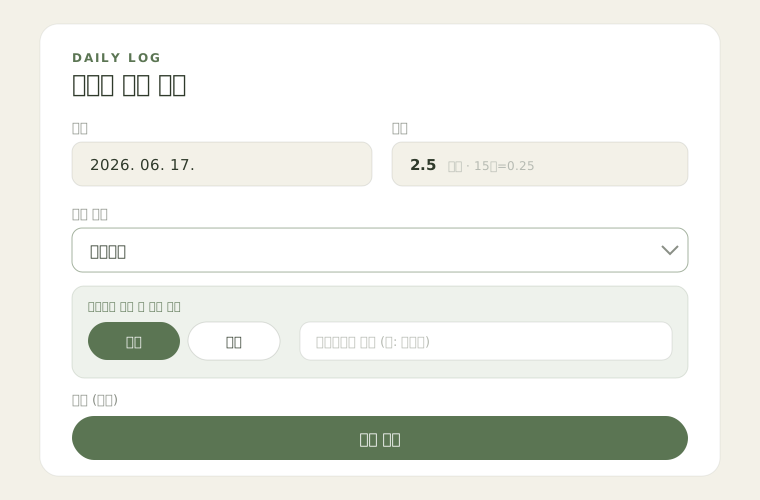
💡 Enter hours in 0.25-hour (15-minute) units. Log multiple activities on the same day separately — the monthly report sums them automatically.
- 3
For supervision: individual/group and supervisor name
When you choose ‘Supervision’, extra fields appear (as shown above). Select individual or group and enter which supervisor provided it. (Certification number is optional.)
💡 Per QABA, monthly group supervision hours cannot exceed individual hours. The dashboard ‘Supervision by month’ card flags this.
- 4
Save, and your progress appears instantly
Hit ‘Save’ and you’re done. Back on the dashboard, cumulative hours, this month’s hours, and your activity balance (indirect : direct) are computed automatically. Made a mistake? Edit or delete it right in the ‘Recent logs’ table.

💡 QABA recommends at least 60% indirect and at most 40% direct cumulatively. The donut shows whether you’ve met the target by color.
- 5
Summarize and export with the monthly report
In ‘Monthly report’, pick a month to see that month’s entries as a table. Export as CSV or Excel to keep records or to help fill out official forms.
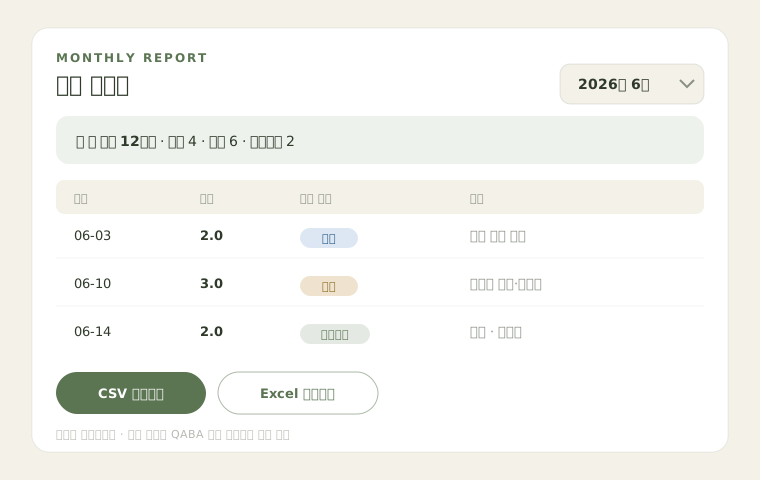
💡 Use the exported file as a reference when filling out the official QABA fieldwork form. Note that this summary itself is not official documentation.
Start right now
Signing up is free, and your first log takes about a minute. If you get stuck, just ask via our KakaoTalk 1:1 channel.